

.hacktron/config.yaml file to your repository to control Hacktron’s Code Review behavior:
- Skip specific pull and merge requests so they aren’t scanned.
- Include specific pull and merge requests to be scanned.
- Fail the Hacktron check when a finding meets a severity threshold, so risky changes can’t merge.
.hacktron/rules.md, which shapes the quality of a review. config.yaml controls whether a PR is scanned and whether its check passes.
File location
Place the file at the root of the repository, inside the.hacktron directory:
.hacktron
config.yaml
rules.md
apps
packages
package.json
.hacktron/config.yaml or .hacktron/config.yml is accepted. If both exist, .yaml is used.
Example
config.yaml means Hacktron behaves as it does today: it scans all covered PRs and the check stays green unless the scan itself errors.
Skip scans
Branches, labels, authors, and keywords can be set per repository here, or org-wide in Organization settings. Repo config overrides only the dimensions it sets; other dimensions keep the org default. Theskip block tells Hacktron not to scan a pull or merge request. A match records a skipped check with a comment naming the rule, and uses no developer seat.
Rules are evaluated in this order, first match applies:
| Key | Matches when | Match style |
|---|---|---|
skip.branches | the PR/MR targets one of these branches | case-insensitive glob |
skip.labels | the PR/MR carries one of these labels | case-insensitive |
skip.keywords | the PR/MR title contains one of these strings | case-insensitive substring |
skip.paths | every changed file matches one of these patterns | gitignore-style globs |
skip.authors | the PR/MR was opened by one of these usernames | case-insensitive |
skip.branches and include.branches (and their org-wide equivalents) accept
glob patterns mixed with literals: *, **, ?, and {a,b} brace expansion.
Matching is case-insensitive. [, ], and a leading ! are literal, not
special syntax. Each list allows up to 50 patterns, up to 100 characters each.
Labels, authors, and keywords allow up to 20 entries each.skip.paths skips a scan only when every changed file matches one of the
patterns. If even one changed file falls outside the patterns, the PR is
scanned as usual. Patterns use the same syntax as .gitignore — for example
vendor/**, **/*.md, or docs/.@hacktronai review comment always runs a scan, even when a skip rule would otherwise match — use it to force a one-off review of an otherwise-skipped PR.
Include scans
Use the include block to scan only pull and merge requests that match specific rules. Hacktron records a skip check comment on PRs/MRs it doesn’t scan.| Key | Matches when |
|---|---|
include.branches | the PR/MR targets one of these branches (case-insensitive glob) |
include.labels | the PR/MR carries at least one of these labels (case-insensitive) |
include.authors | the PR/MR was opened by one of these usernames (case-insensitive) |
include.keywords | the PR/MR title contains one of these strings (case-insensitive substring) |
include.labels: [feature, bugfix] matches a PR with either label. Setting include on more than one dimension requires matching all of them: include.branches: [main] with include.authors: [alice] only scans Alice’s PRs targeting main.
skip and include can both be set for the same dimension: skip.labels: [wip] with include.labels: [feature] scans PRs labelled feature, except ones also labelled wip.Fail the check on findings
By default, the Hacktron check is green as long as the scan completes. Findings are posted as inline comments but don’t block the merge. Configure a severity threshold to turn the check red when a finding is at or above that level. When a finding triggers the gate, the GitHub check run (or GitLab commit status) is marked failed.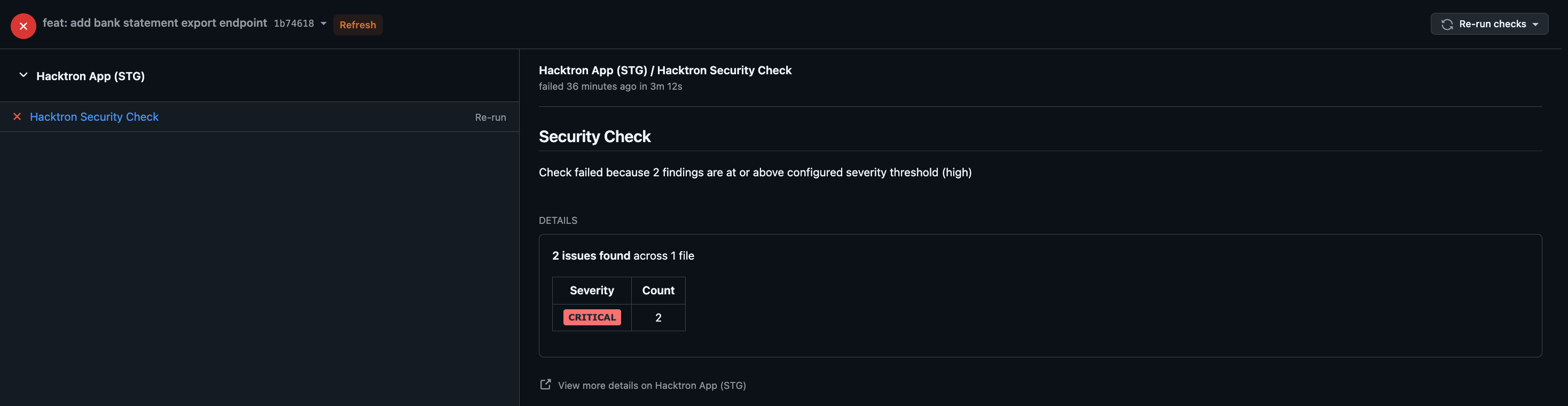
high fails the check on high and critical findings, while critical fails only on critical.
Triaging a finding updates the existing check directly. A finding only counts toward the threshold while it’s still open or confirmed valid; triaging it as anything else removes it from the gate and immediately recomputes the check.
config.yaml. The repository config always takes precedence.
- Organization-wide
- Per repository
Set a default for all repositories in your organization from Organization settings.
How invalid config is handled
Hacktron is fail-open about configuration — a config problem never silently blocks your development:- A missing, empty, or malformed
config.yamlis ignored. Hacktron scans normally and the check stays green. - Unknown keys are ignored, so a config can carry settings for future features without breaking today’s scans.
- A type mismatch on a known key (for example
fail_on.severity: 7) causes the whole file to be ignored. Keep values in the shapes shown above.
Related
Project rules
Add
.hacktron/rules.md to give reviews repository-specific context.Setup
Connect a Git provider, enable repositories, and choose covered branches.